Sunday, June 11, 2017

Build a select dropdown with *ngFor in Angular 2

One of the most repeated questions with angular2 i have come across Stack overflow is "how to generate a select dropdown with an array or object". Hence, i decided to write a sample post with sample code to ease the search.

I will be posting two samples with one simple array and other with object.

Assume you want to generate a dropdown select by having an array with years.

  years = ['2016','2015','2014'];  

The app.component.ts code will look like,

 import {Component} from '@angular/core';  
 import {Http} from '@angular/http'  
 import {bootstrap} from '@angular/platform-browser-dynamic';  
 import { Component } from './Component';  
 @Component({  
  selector: 'material-app',  
  templateUrl: 'app.component.html'  
 })  
 export class AppComponent {  
  years = ['2016','2015','2014'];  
  selectedyear = '2015' ;  
  onChange(year) {  
   alert(year);  
  }  
 } 

In the above cocde selectedyear indicates the default value of the dropdown whenever the app is loaded.  onChange is the event gets fired whenever a option is changed, you can capture the selected value with the event.

And the template  app.component.html will look as follows,
 

*ngFor is being used to repeat the items as options. It's simple as above.

DEMO USING ARRAY

Next we will see how to bind a object using *ngFor . Assume  if you have a object and want to bind the keys as drop down values,

 currencyList = {  
 "USD": {  
 "symbol": "$",  
 "name": "US Dollar",  
 "symbol_native": "$",  
 "decimal_digits": 2,  
 "rounding": 0,  
 "code": "USD",  
 "name_plural": "US dollars"  
 },  
 "CAD": {  
 "symbol": "CA$",  
 "name": "Canadian Dollar",  
 "symbol_native": "$",  
 "decimal_digits": 2,  
 "rounding": 0,  
 "code": "CAD",  
 "name_plural": "Canadian dollars"  
 }  
 };  

to get the keys of object you can use  Object.keys(this.currencyList); and the rest is same as above sample.

DEMO USING OBJECT


Sunday, June 4, 2017

ESLint with Visual Studio Code (vscode)

Poor code quality application can lead to many serious problems when the size of code grows. Linting is the process of checking the source code for Programmatic as well as Stylistic errors. This is most helpful in identifying some common and uncommon mistakes that are made during coding. To do this process many linters are out there like eslint, jshint, jslint etc.  


All the above helps us to be consistent in semicolons, quotes & code formatting etc. In this blog post i will be showing you how you can setup ESLint with visual studio code which is my favorite code editor.


Install ESLint global


Install it globally by using NPM by this command:

 npm install -g eslint  

Download ESLint extension 

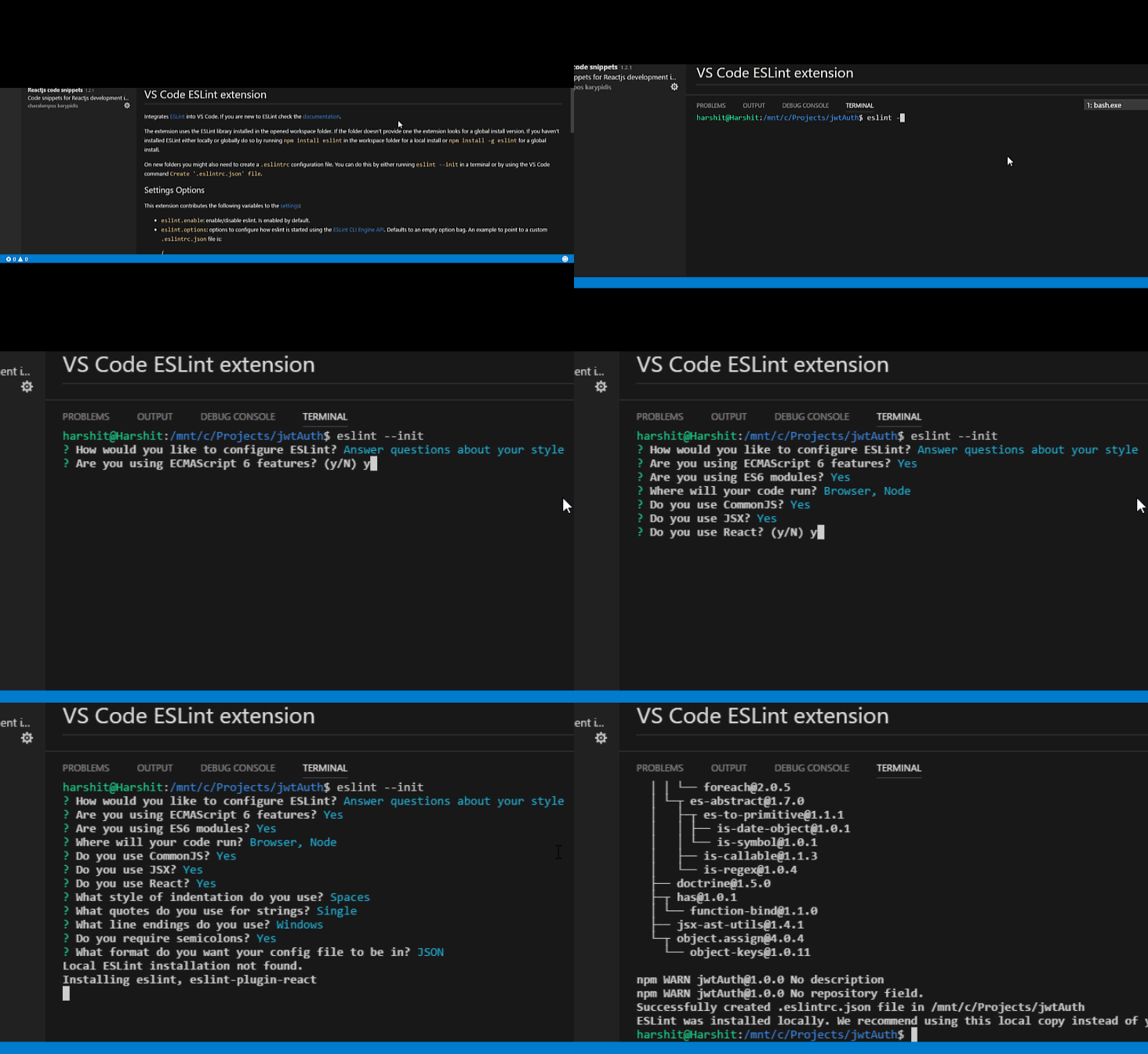
Install the ESLint by downloading the extension, as shown below,


After downloading we need to initialize the ESLint.

Initialize ESLint in project

Next is to initialize ESLint by using Ctrl + ` to open the terminal in Visual Studio Code


That's all folks, now your project is setup with ESLint, from now on it will be very easy to catch lint errors and fix them even if you had missed it. Let's see ESLint in action.


And if you want to explore more on ESLint you can explore it on the website http://eslint.org/

Saturday, June 3, 2017

How to copy a Database from a MongoDB instance to another?

While recently i was working in an application i had to copy the database from a mongoDB  hosted in an mlab instance to my local. I will share an easy step in MongoDB Shell which support to copy database from remote instance to current one with a single command.

DEMO with steps :

I made  two instances of MongoDB from following commands.
 //Instance 1  
 mongod --port 9998 --dbpath /data/db1  
 //Instance 2  
 mongod --port 9999 --dbpath /data/db2  

In instance 1 there is a database called "dsampledb1".
and i started the instance with the following command,

 mongo localhost:9998  

I create a database with one collection with the following command,
 use dsampledb1  
 db.users.save({id:1, name:"sample name"})  

Then I log in to next MongoDB instance using MongoDB Shell.
 mongo localhost:9999  

Now to copy the database from the instance 1 to instance 2 , we can simply use the following command,
 db.copyDatabase("dsampledb1","dsampledb2","localhost:9999")  

Syntax is as follows,
 db.copyDatabase(sourcedb, destinationdb, fromhost, username, password)  


A first-timer’s experience of Microsoft’s MVP Community Connection (MCC)

It was my first ever experience to participate in Microsoft's event outside Sri Lanka. My experience as a “first-timer” attending the South East Asia's MVP community connection, along with few other MVPs from my country. MVP Community Connection is a day to connect, learn, inspire and celebrate the local MVP community and MS employees.


It was an exclusive event especially organized for Asia pacific MVPs. The intention is to have all MVPs from different region join there and have a great time with others. There were some interesting sessions and networking between each other. 

From the moment I got off the plane at the Soekarno–Hatta International Airport Airport, I was very excited about the event. I was the first to arrive AYANA Midplaza JAKARTA 2 hours prior to the event. From the registration, greeted by Microsoft mvp tshirt and  I was escorted to pick up my personal registration badge and Wahoo!. 


First day started with lunch at the Hotel. Everyone had a very good time introducing ourselves in 1 minute with other MVPs.  There were totally around 50 MVPs from various countries in south east Asia and we were snuffled and divided into 7 teams for various activities and sessions. It was really awesome to meet with other MVPs and get some inputs, their works and other things related to personal and professional life. Later with a key note from Soyoung Lee, Community Program Manager on "MVPs for the year 2017 and latest updates". Then we had  hack a plan session on  various topics such as "Emerging Technologies", "Developer Field Presentation" etc andone of the best moment was the group photo .


 Later in the evening we were out for dinner where we had Indonesian varieties of food and MVPs were involved in presenting their culture in various ways.  Finally everyone had a great time and fun on the first day.  Second day, it started with a fantastic breakfast and a team activity , later there were  very productive intense discussions to improve MVP engagement within the Partner network. The day ended with a award ceremony where everyone who attended the session was given away with a cool gift. It was a tremendous experience I had at MVP community connect event at Jakarta,Indonesia. There were lots of things that i could learn from various MVPs. Also it created a very good channel with all other MVPs.  


Saturday, March 18, 2017

Microsoft - A Big Thank You


1/03/2017 was a huge day in my career as I was awarded my first (and hopefully not the last) Microsoft Most Valuable Professional award under the category Visual Studio and Development Technologies. It was such a  Indescribable honor, and i have to give a shout out here to the Microsoft community for their support. There have been so many great mentors/supporters in my career over the past 6  years.Thank you  MVP Community Program Manager, my friends, colleagues, my company,followers and supporters for helping me to get my Microsoft  MVP Award for this year.


I hope this marks only the beginning of this new phase of my professional life and I feel so very lucky to be among the 6 technology leaders under the same category in Sri Lanka. Microsoft has always been a great supporter of the community, and a real partner in our ongoing efforts. I will make sure to work extra hard to give back (even more) to the community and I will be more glad to do it every day! Thank you Microsoft!Thank you to the MVPs who welcomed me and others have helped me throughout the years!


Sunday, March 12, 2017

Visual Studio 2017 has landed!

It has been an amazing journey for Microsoft Visual studio , Recently marking 20 years of software development tool in the industry. Tech giant Microsoft has introduced the discharge of Visual Studio 2017. Users can obtain visual Studio 2017 by visiting https://www.visualstudio.com/.

Every Visual studio fan would have been excited about the release of Visual Studio 2017. Let's see what Visual Studio 2017 offers us ahead of the previous versions.


In one sentence, The builders can use Visible Studio 2017 to create purposes for Android, iOS, Home windows, internet, and cloud. “Code fast, debug and diagnose with ease, test often, and release with confidence".

Productiveness and efficiency , Developers life made easy:

Working with your team with one repository has never been easier. Now we can use the new 'Open Any Folder' feature to immediately open and work with virtually any code file without a formal project or solution around it.

Codebase Navigation:
Visual Studio 2017 refreshes the navigation experience with the following features,

Go To Implementation (Ctrl+F12) – navigate from any base type or member to its various implementations.

Go To All (Ctrl+T or Ctrl+,) – navigate directly to any file/type/member/symbol declaration. You can use the icons along the top of the feature to filter your result list or use the query syntax (e.g., “f searchTerm” for files, “t searchTerm” for types, etc.).

Find All References (Shift+F12) – now with syntax colorization, Find All Reference results can be custom grouped by a combination of project, definition, and path. You can also “lock” results so that you can continue to find other references without losing your original results.

Indent Guides ­– dotted, gray vertical lines act as landmarks in code to provide context within your frame of view. You may recognize these from the popular Productivity Power Tools.

With Visual studio 2017 there has been fre tweaks and additions to make the common
tasks more productively

IntelliSense – User can filter necessary completion list by category by clicking on the icons in the tray or by hovering over them to learn the keyboard shortcut.

Refactorings – use ‘Ctrl+.’ to access all the refactorings and quick actions we’ve added in VS.

Add using/Imports for types in reference assemblies/NuGet packages

Code Suggestions – code suggestions lee the user hint best practicess.

Mobile Support:
Mobile developers favourties both Xamarin and the amazing Visual Studio Tools for Apache Cordova are included in this 2017 release.  Xamarin integration in Visual Studio 2017 is a huge plus.


Testing and Debugging:

Visual Studio 2017 gives the developers debugging experience to identify the source of an issue faster with the following things,

The new Exception Helper

Run To Click

XAML Edit and Continue

Reattach To Process


Open for everyone:

Last but not the least, there is a FREE community version that everyone can try. Also
if you get  60 days of Xamarin University free if you download before 14 March 2017.


Here's a quick rundown of all the features that have arrived on the Visual Studio 2017:

Better startup and load time
Modified navigation with new features
Visual C++
Extended support for C# 7.0 and Visual Basic
Support for F# 4.1 language
Live Unit Testing
Introduction of Git features
Enhanced Visual Studio Feedback Workflow
Inclusion of .NET Core and ASP.NET Core libraries
Xamarin 4.3 support
NuGet support
Azure SDK for .NET
Office Developer Tools for Visual Studio
Developer Command Prompt
Installation Nickname, and other IDE improvements

So, what you are waiting for? Start to download Visual Studio 2017 and check out what's new? You will feel glad  as how i am. Cheers!